> Free SEO Articles, SEO Service Provider, Google SEO Tips, Tools

Jun 15, 2009

How to Add Flash to Blogger, Embed flash files in blogger, Tips

How to Add Flash to Blogger, Embed flash files in blogger, TipsAdd Flash to Blogger

This article or tips explain you about, how to add or upload a flash file in blogger. If you want to add original interactive flash animations to your blog to attract the attention of your visitors, you will have to read these points. First, create your flash videos, movies, etc and upload to your server.

Before you begin, make sure you have a Image Host or Swf file hosts which allow you to upload your swf files onto the web. I, myself am using Google Page Creators but recently they have closed new member registration to concentrate on working on Google Sites.

So, Upload these files and take a link from the Google site. Then paste that url in the below code and use it wherever you want, in your blog post, in the sidebar, etc.

<embed pluginspage=" http://www.macromedia.com/go/getflashplayer" width="120" src=""></embed><strong>http://123funjokes4all.googlepages.com/flash.swf</strong></em>" height="120" type="application/x-shockwave-flash">

After reading this post, provide your feed back or comment.


Read More...

Jun 12, 2009

Key Steps to Before Optimizing Your Website, Important Steps for Optimization

Key Steps to Before Optimizing Your Website, Important Steps for Optimization

Tips for Before Optimizing Your Site for Major Search Engines:
First prepare a list what to do and project goal or client requirement that will make sure your SEO is successful.

  • Target or Goal of website?
  • What is the time-frame for this project?
  • What is the budget for this project?
  • What technology was used to build the site? (i.e. Flash, PHP, frames, Cold Fusion, JavaScript, Flat HTML etc)
  • Does the website contain unique content and with static or dynamic urls.
  • Home page and other pages contain 250 words of content to be optimized?
  • Check the navigation work? Does it use text links or graphical links or JavaScript drop-down menus?
  • Check how many pages does the site contain? How many of these will be optimized?
  • Check the website has a site map or will it require one? Does the site have an XML sitemap submitted to Google Sitemaps?
  • Check the current link popularity of the website
  • Check the approximate Google PageRank of the site.
  • Check the Source code to optimize in better way.
  • List the products/services that the site promotes or offer.
  • Check out the website geographical target markets. (Global, Country, State and Town)
  • List down the Top 20 search keywords or phrases to target the markets and rank in the search engines.
  • List down the major competitors. (Urls, Keywords, Meta Content).
  • Flow the SEO Check List.
  • What are my client's expectations for the optimization project?
If the website currently uses frames, you will need to rebuild the pages without frames or create special No-Frames tags to make sure the site can be indexed, and so on.


Read More...

Jun 11, 2009

How to Upload Blogger Templates, New Blogger XML Templates Replace with Old Template.

How to Upload Blogger Templates, New Blogger XML Templates Replace with Old Template.

In this article or post I want to share new blog tip. How to upload or replace the old blog template with new blog template.

If you're fed up with the normal blogger templates, you can easily upload a customized XML template. Here's a step by step guide.

Now days Blogs are a very popular to have and you can create freely. Blogger templates are in high demand and free. You can upload them very easily.

Few tips to upload New Blogger XML Template:

  • Download your favorite Blogger XML template to your computer. If the Blogger template is contained in a zip file, first you have extracted the XML template then.
  • Log in to your Blogger account and click on dashboard and go to Template> Edit HTML
  • Ensure you back up your old template in case you decide to use it again. To do this, click on the "download full template" link and save the file to your hard drive.
  • Look for the section near the top where you can browse for your XML template
  • Click browse button and upload.
  • The HTML of your new template will now appear in the box below. Preview your template or simply save to start using it.


  • Read More...

    How to Add "Read More" Link in Posts, Add Read More in Blogger Posts

    How to Add "Read More Link in Posts, Add Read More in Blogger PostsRead More Link

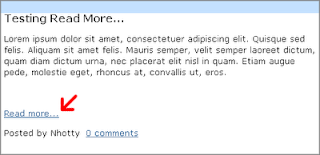
    Recently I am searching for new tips in blogger. This is very useful and very easy if you just follow this article step by step. With this slash, you can choose to display only a selected amount of text from the beginning of each post as a tough one instead of showing the entire post or article on the front page of your blog.

    When Visitor want to read the remaining post or article, they can click a “Read more...” link to read your entire post or article. (Note that you’ll need to have post pages enabled in order to make this feature work.)


    Few Steps:
    1. Login to your Blogger account and go to Layout > Edit HTML (click Expand Widget Template)
    .
    2. Find this line of code:
    <data:post.body/>

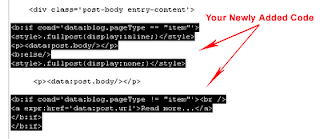
    3. Copy this code just before the code above:
    <b:if cond='data:blog.pageType == "item"'>
    <style>.fullpost{display:inline;}</style>
    <p><data:post.body/></p>
    <b:else/>
    <style>.fullpost{display:none;}</style>
    4. Now, copy this code just after the code above (<data:post.body/>):
    <b:if cond='data:blog.pageType != "item"'><br />
    <a expr:href='data:post.url'>Read more...</a>
    </b:if>
    </b:if>

    Change the Read more... text to whatever link text you want to appear. The result should look something like this now:


    5. Save your template.
    Adding Class Tag in Your Default Post Template:
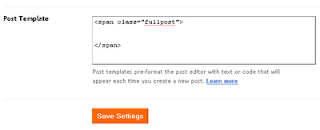
    1. In your Blogger Dashboard, go to Settings > Formatting and scroll all the way down to the bottom. Copy this code and then save settings:

    <span class="fullpost">
    </span>


    Creating a New Post:
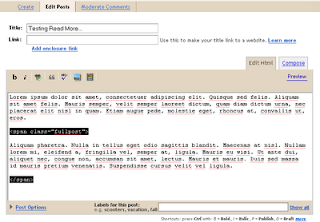
    When you click the Posting tab (HTML mode), you'll notice that your default post template now has <span class="fullpost"> and </span> tags. Anything you put above the tag <span class="fullpost"> will be the teaser text. The main body of your post needs to go in between the <span class="fullpost"> and </span> tags in order for the “read more…” link to work properly. See image below: Publish or preview your new post or article to see your newly created "Read More..." works on your blog.


    Read More...

    Jun 8, 2009

    Free SEO Articles, Free SEO Tips Related Articles, SEM Articles, SMO Articles, Google SEO Updates, SEO Articles by Experts, SEO Articles Related Links

    Free SEO Articles, Free SEO Tips Related Articles, SEM Articles, SMO Articles, Google SEO Updates, SEO Articles by Experts, SEO Articles Related LinksFree SEO Services

    More Articles on SEO


    Read More...

    Search Engine Optimization Services, Free SEO Techniques, Types of SEO Services, Organic SEO Services, Search Engines Positioning, Provides SEO Servic

    Free SEO Services

    SEO Services, Search Engine Optimization Services, Free SEO Techniques, Types of SEO Services, Organic SEO Services, Search Engines Positioning, Provides SEO Services India, SEO Request Quota.
    Search engine optimization (SEO) is the process or techniques of promoting new or existing websites and web directory's for exposure to search engine crawlers for the placement of search engine's database and search engine results pages.
    Search Engine Optimization (SEO) is a technique is used to increases the traffic of the web site and keyword density in web site. Now days Search Engine Optimization (SEO) is more popular in recent years.
    Search Engine Optimization (SEO) techniques we can target the users through our web sites positioning in top search engines like Google, Yahoo and Msn.
    Search engine optimization (SEO) experts have gained popularity these days because their services have become essential in site optimization. Optimizing the website play a key role to rank it high in the search engine result pages or SERP’s of major search engine like Google, Yahoo, MSN and etc.
    We provide Organic Search Engine Optimization in all major search engines - Google, YAHOO, MSN. Natural or Organic Search Engine Optimization means no PPC (Pay Per Click), no sponsored ad, no sponsored rank.

    Occupying a Top 10 Position in Google is more difficult than other compare to other search engines. So we stress on Google Top Ranking.

    We Offers both types of SEO Optimization:

    On-Page Optimization (On-Page SEO) and Off-Page Optimization (Off-Page SEO).

    On Page Optimization:
    Our On-Page SEO Services:


  • Title tags (different title tags on each one of your pages)

  • Meta keyword/description tags (different meta tags on each one of your pages)

  • Anchor tags

  • Attribute of the image tags

  • Keyword selection, research & testing

  • Image optimization

  • URL structuring

  • Content Development

  • Keyword density

  • Track target keywords

  • Internal Linking

  • Site map
    Our Off-Page SEO Services:

  • Keyword research, testing & selection

  • Keywords in links

  • Article Submission

  • Social networking

  • Directory listing

  • Link exchanges

  • One-way links

  • Three-way links

  • Deep linking

  • Blogging

  • Forum posting
    We don't use Black Hat Techniques such as hidden text, hidden link, duplicate content, keyword repetition. We use only natural SEO techniques and provide quality work.
    Related Keywords:

  • seo services india,

  • affordable seo services,

  • seo services uk,

  • seo services delhi,

  • seo services company,

  • search engine optimization and seo services,

  • free seo services,

  • professional seo services,

  • heap seo services,

  • rganic seo services

  • Read More...

    Jun 1, 2009

    Link Bait Ideas, Examples, Link Bait Services, Articles, Tactics and Tips

    Link Bait Ideas, Examples, Link Bait Services, Articles, Tactics and Tips
    link bait ideas, link bait examples, link bait service, how to link bait, link bait articles, promote your link bait, link bait sites, link bait tactics,
    Link baiting or link baiting is also known as natural link building.
    Link Bait means to create naturally that attract our website for getting backlinks from other website and other may discusses on forums, blogging about, what you have post in blog and linking to it from their sites. With the help of this we can receive a lot of visitors.
    List of Link Bait Ideas:

  • Make a valuable resource (lists, special reports, history of, how to, etc.)
  • Interview (e-mail/phone) prominent people and publish it.
  • Build a useful tool
  • Write an interesting article
  • Run a newsworthy ‘event’ such as a contest
  • Test something new that has not been done before
  • Be the first in doing something on the internet
  • Write something controversial
  • Be the first to write the latest news in your niche
  • Be the first to expose a scammer.
  • Disagree with an authority.
  • Write some funny humor.
  • Update a list of interesting pictures.
  • Be the first to research and document something.
  • Make a theme, plug-in or piece of software’s.
  • Make a tool that others can put on their sites but that links to you
  • Make a resource that is just in time for a major event
  • Write an outrageous theory and back it up with logics
  • Write useful comments on something that is happening
  • Give something valuable for free

  • Read More...

    May 6, 2009

    List of Blogging Resources, Most Popural Blogging Tools, Tops Blogging Tips and Resources

    List of Blogging Resources, Most Popural Blogging Tools, Tops Blogging Tips and Resources

    Recommended Blogging Tools and Resources

    This is list of most popular blogging resources on the Internet - all tools and services mentioned here are completely free and have a very large user base.

    Blog Writing Tools

    • Windows Live Writer
    • Scribefire
    • Flock Browser
    • Google Docs

    Image Search and Photo Editing

    • Google Picasa
    • Windows Live Photo Gallery
    • Picnik / Flickr
    • Creative Commons

    Podcasting & Video Blogs

    • YouTube
    • Blip.tv
    • Audacity
    • Windows Movie Maker

    Blog Publishing Platforms

    • Blogger
    • WordPress
    • Tumblr
    • Windows Live Spaces

    Web Statistics

    • Google Analytics
    • Google Ad Planner
    • Statcounter
    • FeedBurner for RSS

    Making Money from Blogs

    • Google AdSense
    • Adify
    • BlogAds
    • Amazon Associates

    Blog Search Engines

    • Google Blog Search
    • Technorati
    • Ask.com Blogs

    Tracking Blogs

    • Google Reader (with translation)
    • FeedDemon + Newsgator
    • My Yahoo! / Google IG


    Read More...

    May 4, 2009

    Top 10 SEO Tips, Startup Guide for SEO, Tips on SEO Starting

    10 Things you must know before doing SEO for your Site.

    1. SEO is not a onetime process
    2. You need to allow your SEO person to optimize content

    3. SEO is online marketing, not a replacement of offline marketing
    4. Consider recommendations from your SEO team
    5. Discuss and finalize the right keywords with your SEO consultant
    6. Show interest towards and trust on SEO
    7. Keep adding content
    8. More the link building more the ROI
    9. No hurry! SEO is a long term process
    10. Do not change the site without discussing with your SEO team


    Read More...

    Free SEO Related Top Articles, Articles on SEO & SEM, Latest Articles on SEO Tips

     
    Latest Topics on SEO, SEM Updates Free SEO Directory List Free SEO | SEM | Google Top Videos