> Free SEO Articles, SEO Service Provider, Google SEO Tips, Tools

Showing posts with label On Page Optimization Tutorial. Show all posts

Jul 1, 2020

SEO Impact calculation or prioritization

Name

Rule type

Description

Missing or empty page title

Title

Your page does not have any content in the page title. Search engines look for the title tag to better understand the main topic of the page.

Page title too short or too long

Title

Short titles may not accurately describe your page and may result in fewer visitors to your page. Titles longer than 70 characters may be trimmed in search engine results.

Duplicate page title

Title

The page has the same page title as another page on your domain. Search engines may consider pages with the same title tags to be duplicate content.

Missing or empty H1 tags

Header Tags

Your page does not have any Heading 1 tags or your Heading 1 tags are empty. Search engines may use heading tags to determine the main topic of your page.

Maximum number of H1 tags

Header Tags

Your page exceeds the maximum threshold for number of Heading 1 tags. Too many Heading 1 tags may dilute the importance of all Heading 1 tags on your page.

Maximum number of H2 tags

Header Tags

Your page exceeds the maximum threshold for number of Heading 2 tags. Too many Heading 2 tags may dilute the importance of all Heading 2 tags on your page.

Missing or empty H2 tags

Header Tags

Your page does not have any Heading 2 tags or your Heading 2 tags are empty. Search engines may use heading tags to determine the main topic of your page.

Missing or empty meta description tag

Meta Description Tags

Your page does not have a meta description tag or the tag is empty. Meta descriptions provide a concise explanation of the contents of a webpage. Search engines use meta descriptions to display preview snippets for a given page to users.

Duplicate meta description tag

Meta Description Tags

The page has the same meta description tag as another page on your domain. Search engines may consider pages with the same description tags to be duplicate content.

Image tags without alt attribute

Image Tags

Images on the page do not have any alternate text. Search engine crawlers use alternate text to understand what images on your page are about. Search engines understanding your images can help your page rank in universal results and on image searches.

Image tags without height & width attributes

Image Tags

Images on the page do not have height and width attributes specified in the image tag. Search engines consider performance when ranking pages, and height and width attributes can improve page speed.

Missing meta keyword tag

Secondary Content Elements

Your page does not have a keyword meta tag. Some search engines may use this tag to help determine what your page is about.

Page URL is too long

Page URL

The URL pointing to the page is too long. Page URLs that are too long may be confusing to users and not accurately describe the page.

Poor text to code ratio

Secondary Content Elements

You have too little or too much text compared to the code on your page. A poor text-to-code ratio can affect the readability of your site by search engine crawlers.

Page size too large

Secondary Content Elements

The content on your page (text, images, videos, etc.) is too large. Large page sizes may affect the ability of search engine crawlers to index your site.

Duplicate page content

Secondary Content Elements

The content on this page matches the content on another page. Duplicate content can make it difficult for search engines to know which version of the page to include in their indices, to direct authority and link juice to, and to rank on a SERP.

Invalid Canonical URL

Secondary Content Elements

The Canonical URL set for the page is formatted incorrectly. Canonical URLs help search engines apply page authority and link juice to the proper pages within your domain.

No Html4 or Xhtml1 validation

Secondary Content Elements

Notifies whether or not your page has HTML or XHTML validation. This rule serves as a notification and does not affect your SEO.

Canonical URL not in sitemap

Secondary Content Elements

Notifies you whether or not your Canonical URL is in your sitemap. This rule serves as a notification and does not affect your SEO.

Noindex

Indexation Directives

Notifies you whether or not the page has a noindex tag. Pages with a noindex tag will be ignored by search engine crawlers. This rule serves as a notification.

Nofollow

Indexation Directives

Notifies you whether or not the page has links with nofollow tags. This rule serves as a notification and does not directly affect your page's SEO, but rather affects the SEO of pages that are being linked to from the page. Links with nofollow tags do not provide authority or "link juice" to the linked page.

Noarchive

Indexation Directives

Notifies you whether or not the page has a noarchive tag. This rule serves as a notification and does not affect your SEO.

Nosnippet

Indexation Directives

Notifies you whether or not the page has a nosnippet tag. Pages with a nosnippet tag will not show a description under the link in a SERP. This rule serves as a notification.

Noodp

Indexation Directives

Notifies you whether or not the page has a noodp tag. This rule serves as a notification.

Notranslate

Indexation Directives

Notifies you whether or not the page has a notranslate tag. This rule serves as a notification and does not affect your SEO.

Noimageindex

Indexation Directives

Notifies you whether or not the page has a noimageindex tag. This rule serves as a notification.

Unavailable after date in the past

Indexation Directives

Notifies you whether or not the page has a unavailable_after:[date] tag. This specifies a time and date that search engine crawlers should no longer index the page. This rule serves as a notification.

Disallowed by robots.txt

Indexation Directives

Notifies you whether the page is disallowed on the robots.txt page. This rule serves as a notification.

4xx Errors

Page Errors

The page has a 4xx error. These errors may limit a search engine's ability to crawl all pages on your site and may indicate a low-quality domain.

5xx Errors

Page Errors

The page has a 5xx error. Search engines use frequency of page errors to help determine the quality of a site.

3xx Redirects

Page Errors

The page has a 3xx redirect. The type of redirect, either 301 or 302, have different affects on "link juice" from the page.

Slow Response Time

Page Speed

The page has a load time longer than the maximum specified threshold. Search engines use response time to help determine the quality of a page.

Too Many Redirects

Page Speed

The page has more redirects than the maximum specified threshold. Unnecessary redirects may increase response time of a page. Search engines use response time to help determine the quality of a page.

Broken internal links

Internal Links

Links within the page do not lead to valid pages. Broken links can affect a search engine's ability to properly index pages on your domain.

Too few inbound internal links

Internal Links

The page has less than 5 links pointing to the page.

Too many outbound internal links

Internal Links

The number of outbound links on the page exceeds the maximum specified threshold. Too many outbound links can overwhelm a visitor and lead to a bad user experience.

Missing open graph title tag

Object Tags

The page is missing the title attribute in the open graph tag. Open graph tags influence the way the page appears on social media. Improved performance on social media may drive increased traffic.

Missing open graph type tag

Object Tags

The page is missing the type attribute in the open graph tag, which indicates the type of the object (such as video). Open graph tags influence the way the page appears and performs on social media. Improved performance on social media may drive increased traffic.

Missing open graph URL tag

Object Tags

The page is missing the URL attribute in the open graph tag. Open graph tags influence the way the page appears and performs on social media. Improved performance on social media may drive increased traffic.

Missing open graph image tag

Object Tags

The page is missing the image attribute in the open graph tag. Open graph tags influence the way the page appears on social media. Improved performance on social media may drive increased traffic.

Missing open graph description tag

Object Tags

The page is missing the description attribute in the open graph tag. Open graph tags influence the way the page appears on social media. Improved performance on social media may drive increased traffic.

Missing open graph site name tag

Site and Admin Tags

The page is missing the site name attribute in the open graph tag, which lists the parent domain for the page. Open graph tags influence the way the page appears on social media. Improved performance on social media may drive increased traffic.

Missing Facebook admin and App ID tag

Site and Admin Tags

The page is missing the admin attribute and App ID attribute in the open graph tag. These attributes influence how your page is accessed on social media. Improved performance on social media may drive increased traffic.


Read More...

Jun 23, 2009

Keyword Density, Importance of Keyword Density, Google keyword Density, Keyword Density Tool, Keyword Density Checker

Keyword Density, Importance of Keyword Density, Google keyword Density, Keyword Density Tool, Keyword Density Checker

Keyword density means the number of times the target keywords appear in the web page or in content. Don’t repeat the keywords n numbers of times in article to rank well in search engines unnaturally. Repetition of keywords n number of times will treat as spam. But only we can use at important places where needed.

Keyword density is calculated as the total number of word in article divided by repetition of target keyword. For example, your web page has 100 words and you use the selected keyword for 5 times in different parts of the content. Then, your keyword density is calculated as 5%.
You have to maintain the keyword density is between 5% and 7%. This range is the best for your keyword optimization and you should limit within it.
You may optimize the every website and web pages. And you can optimize not only for single keyword but also a combination of two keywords or key phrases.

How to Calculate the Keyword Density:

  1. First of all copy the total content from a web page and paste it into a MS Word documnet.
  2. Second step Now press Ctrl+A to select all the text. Then, go to 'Tools' menu and select 'Word Count'. It will show you a statistics dialog box. Note down the total number of words.
  3. Third step, go to the 'Edit' menu and click 'Replace'. Type in the keyword you want to find and replace with the same keyword. After that, click 'Replace All' button and the system will show the number of replaced words.
  4. Now that you have already found the total number of words and the total number keywords, use the formula: Total number of keywords / Total number of words x 100 = Your keyword density. Remember, the keyword density is always expressed in percentage.


Read More...

Jun 19, 2009

List of SEO Glossary, Glossary Terms,SEO Terms & Definitions, Global SEO Glossary

List of SEO Glossary, Glossary Terms,SEO Terms & Definitions, Global SEO GlossaryList of SEO Glossary
Algorithm: Algorithm is a programming rule that tells how search engine indexes contents.

Alt Attribute: This is useful to define a image for search engines and alternative text description for images.
Anchor Text: This is useful to define a text part of the link and play key role in SEO, search engines as an important ranking factor.

Back links: Back links are inlinks, inbound links, incoming links (whatever you want to call it) pointing to a web page.
B2B: Business-to-business. An exchange of products and/or services between businesses.
Banned: This term is used when search engine blocks your site from appearing in its SERP (Search Engine Result Pages).
Black Hat: This is a technique to optimizations the web pages against the search engine guidelines.
Blog: Blog is a website also known as "weblog". Blog is an online diary or a website were you can share your feeling or thoughts with rich contain, commentary, , events, or other materials. Entries are commonly displayed in reverse-chronological order.
Bot: short for robot.
Cache: Cache is the copies of WebPages stored on internet user's hard drive or in database.
CPC : CPC stands for Cost per Click, Cost per Click measures the cost on a per click basis not based on click thorough.
CSS Cascading Style Sheets : CSS is an external file and used for adding styles to web pages of the website. This helps in opening the page quickly on the web.
Cloaking: This is a black hat SEO technique in which the content presented in two ways. One to the search engine spiders and the other presented to visitors.
Cookie: Cookie is the information stored on searchers computer by a server while accessing a particular webpage.
CPM: Cost-per-thousand. A method of online advertising where the ads cost money, even if they don't generate a click.
Directory: Directory is where the websites are placed in a relevant category with .
Domain Name Registration: The Act of registrar approved registering the domain name and process is overseen by ICANN.
Doorway Domain: A domain designed for redirecting the traffic to a main website which is located in another domain.
Doorway Page: Doorway page means a page which is designed as welcome page of a website, these doorway pages a specially created for high rank websites, search engines and also referred as welcome mat page or gate way page.
Download: When information is send from any system in network is copied or extracted that files is called Downloading.
Dynamic Content: The content that just viewed by user. In this content is updated automatically often from the database.
EPC: It stands for Earning per click. This can be calculated by dividing the total earnings from click through by the number of clicks.
EPV: It stands for Earning per Visitor. This can be calculated by dividing the total earnings from visitor by the number of visitors.
Error Log File: When web server shows time-out request error. Then this request is recorded in HTTP.sys as error log file.
Forum or message board is a place where discussions on related topics takes place. Forums are also used by search engine optimizers and webmasters for information exchange.
FFA: FFA stand for - free for all. Some websites allow anyone to submit websites in their webpage this is called FFA.
Filter Words: Filter words are common words; search engines are not including the common words in their data base. Examples for common words are the, is, and, can so on.
Frames: In order to have multiple windows in a browser HTML tag frames are used. Frames are static when clicked different frame is opened.
Frequency Cap: Maximum number of times an advertisement that is shown to a website visitor is a Frequency Cap.
Google: is the world's number one search engine founded by Standford University students Sergey Brin and Larry Page in 1998.
Google Boot: is a search bot used by Google to collect documents from the
web to build a searchable index for the Google search engine.
Gray Hat SEO: is a search engine optimization using both Black Hat and White hat techniques.
Heading tag: is an HTML tag often used to denote a section heading of a page. SE pays attention to text marked with a heading tag.
Home Page: is the main page of a website also known as front page or server directory index. Usually the home page accumulates the most page rank score since other sites usually links to it the most.
HTML: stands for Hyper Text Markup Language. HTML is a computer language used to create pages and on the .
Hyperlink: is a text or graphics that, when clicked on takes the user to another page location.
Hidden text: Text in the webpage is readable to search engine spiders, but not visible to users. This is done to falsely inflate the keyword density of a website without affecting its visual appearance. Hidden text is now detectable as spam by the majority of the major search engines and sites are penalized for using this method.
Hit: The measure of the number of webpages matching a query returned by a search engine or directory.
HTML: HyperText Markup Language. The main scripting language used to define the content and appearance of a webpage.
HTTP: HyperText Transfer Protocol. The main protocol used to communicate between web servers and web browsers.
Inbound links: are links that point to your site from other pages, also inbound links are important asset that can improve your site's PR (Page ).
Inlinks: another synonym for back links.
Impression: A single view of one page by a single user. It is often used in calculating advertising rates.
Index: The database of webpages maintained by a search engine or directory. See also search engine and directory.
JavaScript: JavaScript is a programming language most commonly used to add interactive features to WebPages.
Java: Java is a high level programming language in which web pages can be built. It can be executed in any platform.
Key phrase a search phrase composed of keywords.
Keyword is a word that search engine user use to find relevant pages. It is also the term that captures the essence of the topic of a document.
Keyword density is the number of times a keyword or key phrase appears on a page.
Keyword popularity is the number of occurrences of searches done by internet users of a given keyword during a period of time.
Keyword research is used in to find and research actual search terms people enter into the .
Keyword stuffing is the act of placing excessive amounts of keywords into a page for the purpose of boosting page's ranking in SERP. Its use is strongly discouraged.
Keyword rich is when a given page is full of good keywords rather than bunch of meaningless words.
Link Bait: Link bait or Link baiting is one of the great ways to get backlinks. This is something on your site that naturally attracts backlinks from other pages.
Landing Page: A webpage viewed after clicking on a link within a search engine listing. Also referred to as a bounce page, or click page.
Link Building: Link building is a off page optimization technique where the number and quality of inbound links from outside sites are increased to improve a webpage's link popularity, thereby boosting a webpage's rank in the search engines.
Link farm is a group of websites that all hyperlink to every other site in the group for the purpose of inflating link popularity or Page . Participating in a link farm could get your site banned by .
Link Popularity is the number and the quality of the inbound links pointing to a given page.
Links are text or graphics an internet user clicked to get to another page location.
Meta is a hidden HTML code that describes the of a page in search results. It should be relatively short; around 12 to 20 words is suggested.
Meta keywords is a hidden HTML code pertaining to the page . It is now ignored by most of the because search engine spammers have abused this tag.
Mirror Sites: Sites that are designed to be duplicates of an original site, but are hosted at a separate domain. Mirror sites are often used in SEO to allow for the use of keyword rich domain names. This is a recognized spam tactic and is penalized by many of the major search engines.
Nav Bar: Nav Bar stands for navigation bar. It is a site's navigation icons usually arranged in row down the left hand side or along the top and plays crucial roles in getting site's visitor to go deeper in the site and also directing the spiders to the most important of the site.
NetFind: NetFind is only America's search engine.
NewHoo: Newhoo former name of the Open Directory Project.
Outbound links are links from your pages to another page in different domain.
Open Directory Project: Largest human edited directory on the internet. Also know as DMOZ which is very large directory in the internet
Open Source: It is software through which people can access to see the source code of a particular page under the same open source agreement
Open Text: To search a specific keywords in a program and returns a list of keywords from World Wide Web for that documents
Opt-In: A Program that offer a user to participate is known as opt-in
Optimization: A set of techniques to process of modifying and marketing a website for higher rankings in search engine results to index and presenting with a different look to a visitors.
Page (PR) is an algorithm use by to measure the authority or relevant importance of a page.
Reciprocal links is the practice of trading links between sites.
Search Engine is a site that offers a information’s to visitors to search for information on the World Wide .
Search Engine Marketing (SEM) are strategies and tactics that seek to promote websites by increasing their visibility in .
Search Engine Optimization (SEO) is the process of getting high search placement in organic or natural listing of .
Search Engine Result Page (SERP) is a page where results of search query are listed.
Spam is a manipulation technique that violates search engine guidelines.
Spider is a robot sent out by to catalog websites on the internet. It is also known as a bot or crawler.
Tagging is a non hierarchical keyword assigned to a piece of information such as bookmark that helps describe an item and allows it to be found by searching or browsing.
Title tag is one of the most important bit of text on a page as far as search engine is concerned. It can be found at the very top of the browser window, above "back", "forward", "refresh".
Traffic is the number of times a website is viewed by a unique visitor within a stipulated time.
Unethical SEO is a tactics which violates search engine TOS, term of service that can put a site at risk of being penalized or banned.
Unique visitors is a term used to describe the total number of visitors to a site over a certain period of time.
URL stands for Uniform Resource Locator. It is the address of a page in the world wide .
White hat SEO is the ethical SEO techniques approved by the .
XML stands for Extensible Markup Language. XML is a simple, very flexible text format used to syndicate or format information using technologies such as RSS.
Yahoo is one of the top 3 . It is also one of the oldest and most established directories on the .


Read More...

Feb 24, 2009

Meta Language Tag, Meta Tag Languages

Meta Language Tag, Meta Tag Languages

In HTML elements, the language attribute specifies the natural language. This post is mostly worried with how to specify the primary language and the base language in HTML documents.

Example of the META Language Tag:

The value of the Content attribute of the META element is the same as the value of the Content-Language header in HTTP; i.e, a comma-separated list of language codes. For example:
<meta http-equiv="content-language" content="en">
<meta http-equiv="content-language" content="en, fr">

Here is a listing of the ISO 639 2 letter language codes...

AA "Afar"
AB "Abkhazian"
AF "Afrikaans"
AM "Amharic"
AR "Arabic"
AS "Assamese"
AY "Aymara"
AZ "Azerbaijani"
BA "Bashkir"
BE "Byelorussian"
BG "Bulgarian"
BH "Bihari"
BI "Bislama"
BN "Bengali" "Bangla"
BO "Tibetan"
BR "Breton"
CA "Catalan"
CO "Corsican"
CS "Czech"
CY "Welsh"
DA "Danish"
DE "German"
DZ "Bhutani"
EL "Greek"
EN "English" "American"
EO "Esperanto"
ES "Spanish"
ET "Estonian"
EU "Basque"
FA "Persian"
FI "Finnish"
FJ "Fiji"
FO "Faeroese"
FR "French"
FY "Frisian"
GA "Irish"
GD "Gaelic" "Scots Gaelic"
GL "Galician"
GN "Guarani"
GU "Gujarati"
HA "Hausa"
HI "Hindi"
HR "Croatian"
HU "Hungarian"
HY "Armenian"
IA "Interlingua"
IE "Interlingue"
IK "Inupiak"
IN "Indonesian"
IS "Icelandic"
IT "Italian"
IW "Hebrew"
JA "Japanese"
JI "Yiddish"
JW "Javanese"
KA "Georgian"
KK "Kazakh"
KL "Greenlandic"
KM "Cambodian"
KN "Kannada"
KO "Korean"
KS "Kashmiri"
KU "Kurdish"
KY "Kirghiz"
LA "Latin"
LN "Lingala"
LO "Laothian"
LT "Lithuanian"
LV "Latvian" "Lettish"
MG "Malagasy"
MI "Maori"
MK "Macedonian"
ML "Malayalam"
MN "Mongolian"
MO "Moldavian"
MR "Marathi"
MS "Malay"
MT "Maltese"
MY "Burmese"
NA "Nauru"
NE "Nepali"
NL "Dutch"
NO "Norwegian"
OC "Occitan"
OM "Oromo" "Afan"
OR "Oriya"
PA "Punjabi"
PL "Polish"
PS "Pashto" "Pushto"
PT "Portuguese"
QU "Quechua"
RM "Rhaeto-Romance"
RN "Kirundi"
RO "Romanian"
RU "Russian"
RW "Kinyarwanda"
SA "Sanskrit"
SD "Sindhi"
SG "Sangro"
SH "Serbo-Croatian"
SI "Singhalese"
SK "Slovak"
SL "Slovenian"
SM "Samoan"
SN "Shona"
SO "Somali"
SQ "Albanian"
SR "Serbian"
SS "Siswati"
ST "Sesotho"
SU "Sudanese"
SV "Swedish"
SW "Swahili"
TA "Tamil"
TE "Tegulu"
TG "Tajik"
TH "Thai"
TI "Tigrinya"
TK "Turkmen"
TL "Tagalog"
TN "Setswana"
TO "Tonga"
TR "Turkish"
TS "Tsonga"
TT "Tatar"
TW "Twi"
UK "Ukrainian"
UR "Urdu"
UZ "Uzbek"
VI "Vietnamese"
VO "Volapuk"
WO "Wolof"
XH "Xhosa"
YO "Yoruba"
ZH "Chinese"
ZU "Zulu"


Read More...

Feb 11, 2009

Meta Tags Guidelines

Meta Tags Guidelines

Information about meta tags. How to write meta tags and use of meta tags. Meta information is used to describe the type of information found on the web page.

There are 2 meta tags like meta keyword tag and meta description tag used in Web page code whose usage is frequently misunderstood and commonly misused. If you want to know more about other meta tags, see Important HTML Title Tags. Some people might argue that the HTML title tag is a meta tag.

Rules of Meta Tags:

The first rule for the meta tags is that each one should be unique and should not be duplicated anywhere in a Web site. If you are duplicating the meta tags then Google has been dumping some Web sites into their supplemental result database when the site uses the same meta tags on multiple pages, so it is important to make sure that each of these meta tags used in your site is unique. Pages relegated to the supplemental result database rarely show up in most Google searches, so make sure that each of these meta tags an title is unique.

Now more about:


Read More...

Meta Description Tag Guidelines

Description Meta Tag Guidelines

Use up to 200 characters for the meta description tag. The description meta tag will not help much with better rankings, but it is a great marketing tool. Most search engines, use meta description tag shows up as the description for the page in the search result pages, so using it is a great way to convince users to click on your link rather than one of the other nine pages listed in the search results.

Many search engines--including Google, MSN and Yahoo--will highlight the words used in a search, which helps to draw attention to your page's listing in the search results. At the time of writing the text for the description meta tag, think about the search phrase or target keywords someone might use when they find the page in a search engine and focus the text to indicate that your page.


Read More...

HTML Title Tag Guidelines

HTML Title Tag Guidelines

The HTML title tag play a key role in On page Optimization (SEO) and Title tag will effect the ranking with major search engines. Html title tag is the most important page element for defining the page's keyword theme.

Tips for Html Title Tag:

Use up to 66 characters for the title tag. Keep the text in the HTML title tag short and target the main keyword for the page. The target keywords are those for which you wish to see the page rank well and rank high in search engines.

The keyword theme should ideally appear multiple times in the page content. The first 2 or 3 keywords in the HTML title tag give relevance to the content of the page. If you wish to add the company name, put it on the right side. It is much more important for users to find your Web page using search keywords. Users will not search for your company name unless they already know who you are. Focus your keyword themes on the products and services you offer.


Read More...

Meta Keyword Guidelines

Meta Keyword Tag Guidelines:

The Meta Keyword Tag play a key role and keyword meta tag will not affect your rankings with the major search engines, but it can help with smaller search engines. Meta keyword tag use is completely optional. None of the major search engines have used it for ranking purposes for at least 6 or 7 years.

Tips for Meta keyword Tag:

Use up to about 200 characters for this Meta tag and use only those target keywords which contain in article or content o the page. If you are using un related keyword or phrases that are not found on the page then search engine can panelize the website, so avoid useing any words or phrases not found on the page. Separate each keyword phrase in the keywords meta tag with a comma. If you have several pages that would normally use the same set of keyword phrases, just rearrange the order of the phrases.


Read More...

What is a Supplemental Result?

What is a Supplemental Result? How Do I Get My Pages Out of Supplemental Results?
Supplemental Result

Google finally found a solution in August of 2007 to resolve the supplemental results issue that I want to share in this article. Somewhat those rectify an issue with their algorithm that was apparently dumping millions of web pages into their supplemental results database. That does not mean that the supplemental results database is disappeared, nor does it mean that pages deemed to be less worthy will now start appearing in searches.

Regularly Google refreshing the supplemental results database, so once the issues with a web page were resolved, they were moving back to the main database much quicker.

The Supplemental Result is stored in separate database of Google main database. Google remove the WebPages from main searchable database and which means they do not show up in normal search results. In simple web pages are penalized by Google due to few reasons like copied content, duplicate title, description and keywords.

Few Reasons for showing Supplemental Results:

  • Lack of content on a page.
  • Duplicate content.
  • Content from another site in HTML frames or iframes.
  • Affiliate marketing links.
  • Obsolete pages.
  • Link pages.
  • Links to Bad Neighborhoods.
  • Duplicate HTML Title tags, Description Meta tags and Keyword Meta tags.
  • Old content.

How Do I Get My Pages Out of Supplemental Results?

The Google spiders periodically crawl pages stuck in Supplemental Results, but Google use different spider and it does not visit these pages very often.
Most of this Web site was trapped in Supplemental Results for a long period. We have uploaded the few pages and submitted to Google and after few days those are displayed as supplemental results in Google search results.

We noticed that all page are came under supplemental results. The flagging increased weekly and spread like a virus until it began to penalize all of the 100% original content pages found in the main portions of the site.


Then we modified the content and meta tags and re-submitted to Google. Within about a week, almost all of our original content pages were removed from Supplemental Result hell and Google traffic began to flow in once again.


Read More...

Importance of Alt Tag in SEO

Importance of Alt Tag in SEO


Alt Tag Hear I want to share little information on importance of alt attributes on images and their effect on search engine optimization. Alt tags attribute means, when you are placing a mouse over an image then text will appear, it is not a tool tip.

Alt tag were shaped initially for text based browsers, like lynx, which can not display images. The alt (or alternate) text was to describe what it is an image of, and should still be used only for that.

Alt tag are put into code like this:

<img src="http://www. online-seo-information.blogspot.com/images/logo.gif" alt="Some Text Here">

Google give more importance to Alt tag to improve the SERP. So really it's a good idea to use Alt tag to describe the image, and keep your text in the body of the page in areas that are readable to your users.


Read More...

Jan 19, 2009

On Page Optimization

On Page Optimization, On Page Optimization Basics

On Page Optimization


On page optimization is a method that makes a webpage additional search engine friendly. With the help of On Page Optimization, search engines will be able to send targeted or relevant traffic to a webpage.

Guide to On Page Optimization:

  • Make sure that all of your web pages can be indexed by search engines.
  • Make sure that you have unique content in the WebPages.
  • Write unique title for individual pages with keyword rich.
  • Use the meta-tags like description tag and keyword tag.
  • Use Header Tags like H1, H2, H3, H4, H5 and H6.
  • Make sure that your web page URLs are SEO friendly and keyword rich.
  • Bolded the keywords in content at least four times in the webpage.
  • Make sure that you use descriptive URLs for your images.
  • Make sure that you label all of your images with descriptive alt attributes.
  • Use keyword rich anchor text links within your content.
  • Give proper inter links (Navigation Structure) between the relevant pages and relevant category.
  • Use the rel="nofollow" tag in the links to these pages.
  • Use the W3C validator to check your markup.


Read More...

Jan 9, 2009

Important of W3C Validation, Tips of W3C Validation

Important of W3C Validation, Tips of W3C Validation

Important of W3C Validation

W3C is an important part of website design. You may have something that looks good, you can do for all pages, but if a website is validates it meets the standards for all the stuff that goes on in the background.
The W3C set the standards for web development and provide tools to check if websites meet the standards. Related to, what the site contain of content, images, anything, the site should still pass the validation check.
When website has a W3V Validation certificate it means that all of the code that is used to make the pages that people see is written correctly. Website should work for anyone anywhere on whatever they choose to view the page on, and it should look the same. All users will get the same experience, and that experience is the one you expect them to have.

Important of W3C Validation:

  • Your website will be more easily accessed by people with disabilities and the user experience will be improved.
  • W3C validation helps you reduce the amount of coding on your pages thus emphasizing the importance of content.
  • Your site will have the chance to get indexed and as a result get higher rankings in the most important search engines, since spiders are known to crawl websites with relevant content.
  • Your website can be easily accessed from different devices – PCs, laptops, PDAs, cellular phones, etc.
  • Validation is fully compatible with a wide range of dynamic pages, scripting and active content, multimedia presentations, etc.
  • Different current and future browsers will display pages in the same way, or at least in a very similar fashion.

Tips of W3C Validation:

  • Faster Loading
  • Search engine friendly pages
  • Less load on server / Cheap hosting Price
  • Larger Audience / Browser Compatibility
  • Easy to make changes in the future and less designer cost


Read More...

File Naming, Link Text Optimization

File Naming, Link Text Optimization, Naming Structure of files for Search Engines

This is also one of the important factors in On Page Optimization. Create a file or folder related to category or sub-category with keywords. If your Website selling the products, and your “About Us” page could have the file name “aboutus.html” but then you would not have any keywords in it. It would be better to have “products-aboutus.html” or “products-foot-wears.html”.

Create a file names descriptive and use targeted keywords. If you create a category and sub-category, also make sure that your are using the important keyword.

Avoid using space in file and directory names or products name. Never create a file such as “page1.hml” or “26562.html”, use target keyword related to content. If you want to use space between the keywords in your file names or url, use”-“between the two keywords like but "free-seo.htmt", which would boost your pages on many search engines.

Use the Anchor text as we discussed the important in the Anchor text article. Link text refers to the part of the URL that is seen on the page, the visible text that a user clicks on.


Read More...

Anchor Text Optimization, Important of Anchor Text, Anchor Text SEO

Anchor Text Optimization, Important of Anchor Text, Anchor Text SEO, Anchor Text Html

Anchor Text Optimization

Anchor Text?
Anchor text is the hyperlinked text found on a Web page which link site users to detailed page that contains full information about the linking page. For example, consider link search engine optimization, when you put the cursor on the link and click on it, it will show the hidden
What is Anchor Text Optimization?

Anchor text optimization is the process of optimizing anchor texts using target keywords to get higher rankings for those keywords in SERPs. Using keywords in Anchor text to link to pages having related content.
All major search engines give a importance to anchor texts in comparison to mere links. By placing keyword in hyperlinks and use them to link with related pages then search engine considers this as additional value to the page.

How to optimize for anchor text?

Anchor text can be optimizing in two ways.

  • Internally Anchor Text
  • Externally Anchor Text

Internal anchor text optimization means internal linking within a website using related keywords as anchor texts.
External anchor text optimization means, inbound links from websites, directories, forums and blogs using necessary keywords as anchor texts.
Importance of Anchor Text Optimization:

  • Optimize the Anchor text for content related keywords link to different pages.
  • Anchor text optimization is mainly done in order to secure higher search engine ranking.
    Anchor text optimization can be done externally and internally.
  • External anchor text involves getting inbound links form other websites, directories, forums and blogs using necessary keywords as anchor text.
  • Internal optimization of anchor text can be done by using specific keywords on the links that link the various pages within the website.
  • With the help of Anchor text we can rank high in search engine.
  • We can increases the relevancy of a webpage in search engine ranking by linking with related inner pages of the website.
  • Google give more important to Anchor text for calculating the relevancy and page rank of the webpage.
  • Anchor text optimization is an important off-page optimization factor as it tells search engine what the linking page is all about.

Anchor Text Html:

<a href="url">Free SEO Articles</a>


Read More...

Content Optimization SEO, Content Optimization Tips, Optimize Page Text

Content Optimization SEO, Content Optimization, Optimize Page Text, Web Content Writing

Content Optimization SEO

Content play a key role for website. Website contain good design, simple navigation structure and with keyword rich unique content.

Many people think that, in webpage should contain high keyword density in content, but the SEO experts believe that use the targeted keywords in the content which is relevant to the content.

Content management is most equally important from both user and SEO point of view. Content in header tag, title tag and description tag must be optimized well with target keywords so that we can rank easily in search results and occupy the top 5 position in SERP (Search Result Pages).

Tips for Content Optimization:

  • Content is one of the major for ranking well in search result pages. Search Engines do not give much importance to Title Tag; Meta Tags when compare to content in ranking pages.
  • The page Title and Content of the webpage is (<body>text within this area</body>) are the two most critical aspects of Website optimization.
  • Avoid using Flash animations and graphics and less links included in an image map because Search Engines cannot read the text in a graphics.
  • Avoid using graphic buttons or image maps in the Internal Linking Structure.
  • Optimize page text by using keyword phrases within your <body> area
  • Start the sentences with your target keyword phrases.
  • Use keyword phrase multiple times in the body text.
  • Write keyword-rich content that focuses on the 'theme' for that particular page.
  • Content should be Unique and SEO Friendly.
  • Create content primarily for your users, not search engines.
  • Maintain the keyword the keyword density between 4% to 5%.
  • Strong the keywords in the content at least for 5 times for target keywords.

Avoid when Optimizing the Content:

  • Avoid spelling mistakes and grammatical error in the content.
  • Embedding text in images for textual content.
  • Don’t dump large amounts of text on varying topics onto a page without paragraph, subheading, or layout separation.
  • Don’t use the copied content in the webpage’s.


Read More...

HTML Heading tag, Heading Tag Optimization Tips

HTML Heading Tag, Heading Tag Optimization, Heading Tag Tips, H1 Tag

HTML Heading Tag

Headings Tag in HTML:

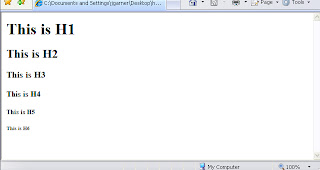
Headings are defined with the <h1> to <h6> tags.

<h1> defines the largest heading and used for main heading
<h2>, <h3>, <h4>, <h5>, <h6> defines the smallest heading and used for sub-headings.
Heading Tags <h1>to <h6> are one of the important factors for On Page Optimization. Search engine give more importance for indexing and for ranking well in search results pages.

Header tag is important for visitors also, since heading tag tells both search engine and visitors what the content is all about.

Heading tags are represented as <h1> to <h6>. <h1> is considered the most important tag by search engine and <h6>, the smallest and the least important.

Example of Header tag is:

Head Tag <h1>

Head Tag <h2>

Head Tag <h3>

Head Tag <h4>

Head Tag <h5>
Head Tag <h6>

Tips for Optimizing the Header Tag <h1> to <h6>:

  • Header tags should contain your target keywords along with any other descriptive text relevant to the content of the page.
  • Search engines give more importance to Header tags to what a web page is all about.
  • The Google ranking algorithm things that if you're using a <h1> tag, then the text in between this header tag must be more important than the content on the rest of the page.
  • Use your most target keyword phrases in heading tags on your webpage.
  • By default, H1 tags aren't formatting, so when we are using a CSS style to override the default

<style type="text/css">
<!--
H1 { color: blue; font-family: Verdana; font-size: 16px }
-->
</style>

  • Use those keywords which are used in Title and Meta tags like description tag and keyword tag. Search engine preferred those keywords which are used in heading tags.
  • Use at least 2-4 heading tags such as <h1>, <h2>, <h3>, <h4> on each page of your website.
  • User those target keyword in header tag which describe the content of the webpage.
  • Add highly relevant keywords in <h1> tag, as it is weighted most than other heading tags.
  • Analyze the relevancy of your keywords and place most important keyword in <h1> tag, less important to <h2>, further less important to <h3> and ultimately least important keywords to <h6>.


Read More...

Jan 8, 2009

Alt Tag Definition, Alt Tag SEO

Alt Tag Definition, Alt Tag SEO, Alt Tag Optimization, Alt Tag Tips, Image Optimization Tips

Alt Tag Definition

Alt Tag Definition:
With the help of HTML tag which provides alternative text when non-textual elements, typically images, cannot be displayed.
ALT Tag is a one of the important factor while Optimizing Image for a web page.

Alt Tag in Html:
The alt attribute is used to define an "alternate text" for an image. The value of the alt attribute is an author-defined text:
<img src="seo.gif" alt="Free SEO Article">
Important Factor for On-page Optimization Alt Tag to Image:
Alt tag generally means the alternative tag. Alt Tag is the HTML tag that tells search engine about the images. Because search engines cannot read text in the images, so with the help of alt tag, search engines come to know about images.

Search engines crawlers are able to index text but they are unable to index the text in the images can create problems. So while making a website you can not only target search engines but the outcome will be generated through visitors.

According to Google friendly site guidelines, we have to create a website SEO friendly and it must helpful to visitors. If we are using the images in the WebPages, in such a situation, alt tag is the best option to add more beauty to your website.
Here are few Tips to add Alt TAg Text to Images:
  • Use ALT Tags to label every image on your web page.
  • Only use the most relevant keyword in ALT Tag to label your image.
  • Do not add unrelated keywords in ALT Tags.
  • Try not to make ALT Tag look like spam for search engines.
  • Add keyword or phrase for important images.
  • For other images like background images, spacers, dividing lines, table borders, and other images used for designing use alt=”” as the Alternate Text.
  • Do not repeat keywords.
  • ALT Text should be a sentence or phrase, instead of keywords separated by commas.
  • The correct way to use ALT Text is:

<img src=”images/seo.jpg” alt=”Free SEO Articles” />

Where seo.jpg is the image name and “Free SEO Articles” is the ALT Tag added to the image so as to label it.
It is recommended to use ALT tag with every image of your web page.
Alt Tag optimization Tips:
  • Use alt tag for all images in the web pages and add most relevant keyword in your Alt tag.
  • Use keywords that are present in title tag, Meta tag and body text.
  • Use 2-3 relevant keywords rather than the repetition of keywords.
  • Use plural keywords in alt tag.
  • Alt tag should not be long and must not exceed more than 7 words.
  • Avoid using of irrelevant keywords in the alt tag that are not related to images instead use keywords that directly explain the images.


Read More...

Site Navigational Structure, Internal Navaigation Structure

Site Navigational Structure, Internal Navaigation Structure

Site Navigational Structure

Navigation structure of a website is important for visitors to navigate from one to other pages quickly. Navigation structure is also help search engines understand what content the webmaster thinks is important.

All sites have a home page, which is the main page of the website and visitors start entering from home to another page of the website.

Before starting the internal linking, we have to think that how visitors will navigate from home page to other pages. If we have different categories that need to be classified under multiple category and subcategory categories then better to have a sitemap page on your site that displays the structure of your website in a single page.

Sitemap page help visitors to visit the internal pages from a single page and this is good from seo point of view because search engines will also visit this page and easily crawl the pages on your site.

A Sitemap.xml file, which you can submit through Google's Webmaster Tools, makes
Easier for Google to crawl the web pages on your site.

Tips for Creating Site Navigation

  • Try to make as simple as possible for visitors to navigate from home page to more specific inner page they want on your site. Add navigation pages in all pages relevant to content and category.
  • Use mostly text for navigation from page to page on your site through text links makes it easier for search engines to crawl and understand your site.
  • Use "breadcrumb" navigation - A breadcrumb is a row of internal links at the top or bottom Of the page that allows visitors to quickly navigate back to a previous section.
  • Create a HTML sitemap page and use an XML Sitemap file.
  • Have a useful 404 page

Avoid for Creating Site Navigation:

  • Having a navigation based entirely on drop-down menus, images, or Animations.
  • Linking each and every page to every other webpage.
  • Going overboard with slicing and dicing your content.


Read More...

Free SEO Related Top Articles, Articles on SEO & SEM, Latest Articles on SEO Tips

 
Latest Topics on SEO, SEM Updates Free SEO Directory List Free SEO | SEM | Google Top Videos